Share a closer look.

For registered contributors: add a plant name, photographs and the details that made you stop and notice.

Header photo Dukeabruzzi, CC BY-SA 4.0

Record your observation

All fields marked * are required.

Assignment 1 demonstration. This form checks your entries locally; it does not send or store them.

Your observation
Letters A to Z, with single spaces between words; maximum 25 characters. Check contributor name: use the format described above.
Letters A to Z, with single spaces between words; maximum 25 characters. Check plant name: use the format described above.
Choose “Not sure yet” if you cannot tell. A guess is fine. Choose a family, or “Not sure yet”.
The day you saw the plant. Choose the date you saw the plant.
State level only. Keep exact locations of rare plants private. Choose a state or federal territory.
Photographs and notes
Choose one or more JPG, PNG or WebP files. Files stay on your device. Check plant photographs: use the format described above.
Include date, general location, visible features and any uncertainty. Maximum 1,500 characters. Add a comment before continuing.

Submitting checks field formats only. No account, authentication, message delivery or saved observation is created.

Your form passed the browser checks.

Your observation fields are complete. No files were uploaded and no observation was published.

No information was transmitted or stored.
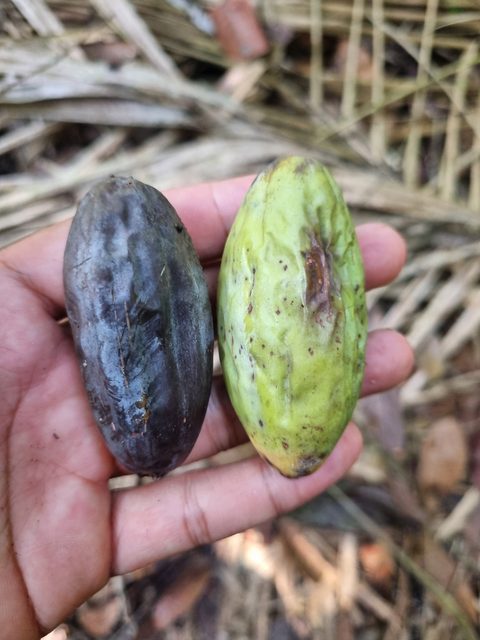
Dark and green Canarium littorale fruits held for scale
Fruits held for scale Photo Akmal Idham, CC BY-NC

Good notes make a difference.

Record what you saw, including uncertainty. The community examples can help you decide what to include. Registration and login are demonstrated separately; access control is reserved for Assignment 2.

Explore first
No account is needed to read the guide.
Know the scope
This is the complete static interface for Assignment 1.
Keep learning
See how HTML5 validation works.